Showing posts with label Windows Vista n 7. Show all posts
Showing posts with label Windows Vista n 7. Show all posts
3/12/2012
Make Your Own Hotspot With Windows 7

Source : Info Teknologi

You are often surf with usb modem would get bored if kept staring at the screen pc / notebook all day, plug in the phone would not be because of gsm / cdma. But with an innate facility of windows 7 you can create your own hotspot with a laptop / pc berwifi. Without purchasing new hardware. Simply follow the following kangkah.
Surely your own modem, connect the internet already, turn on the WIFI adapter. Then began to enter the setup phase,
Go to Control Panel> Network & Sharing Center> Manage Wireless Network Select. Click the Add button, a new screen will appear and then select Create an ad hoc network, and then Next.

Set the password, or made without a password.
Select Save this network for all users of this computer or the Save this network for me only, so that settings can be saved and not have to repeat the previous step next time. And save it.
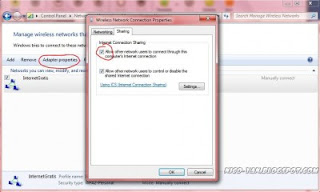
Adapter for sharing internet click Properties, then select the Sharing tab, then check Allow other network users to connect through this computer's Internet Connection. Press OK and then Yes.
Hotspot ready to use.
Read More..
Hard disk partition Safely Without Additional Software in Windows 7
This is one of the advantages of windows xp windows 7 instead, which can make the partition the hard drive securely without using software. On windows xp to partition the drive is done using software like Norton partition magic, partition manager ranish, Eazeus Partition Manager and there are still others.
Partitioning is better done on a computer. With the presence of multiple hard drive partitions, then we will be able to regulate the location or locations for the system drive, and drive for data storage. Thus if suata when windows crashes, or broken, and need to be reinstalled, then the saved data will remain secure. In addition to this, we will partition the drive with a much easier and faster to perform defragmentation, rather than the hard drive without partitioning mamakan will be a long time. This partition can also be useful to prevent or minimize the bad sectors on the disk. So I still suggest that there is only one hard disk partition, preferably on a partition into several partitions.
For friends who use windows 7, if you want to partition the drive into multiple partitions without using software, can be followed following steps:Right click [my computer] >> [manage]
In the "computer management", select the [storage] and select [disk management]

In the right pane visible number of existing partitions. Kemuian right click on the hard drive is not partitioned. (If there is a new partition for example C: right click on partition C:, if there are multiple partitions "as shown below" and going on another partition then right click on the drive that would in another partition) and select [Shrink Volume].

Appear "querying shrink space" and wait a minute.
Shrink window appears. Here shobat asked to determine the volume that the partition will be made. Just fill in accordance with the volume how shobat planned. Then click [Shrink].

It will emerge a new partition is still not formatted or free space (see the partition with a green image). Until this new partition can still be used.

To format the partition to be used, right click on the "free space" before and then select [new simple volume]

Appear [New simple volume wizard]> click [next].
Window pops up [specify volume size]> Click [next] again
Window pops up [assign a drive letter or path]> click [next] again.
Window pops up [format partition]. In the NTFS file system just choose, then the volume label> insert a "drive label name your partition", then click [next].

Window pops up [Completing the new simple volume wizard]. Before you click finish the preview of the information contained. If not in accordance with the wishes shobat, click [back], when it's appropriate please click [Finish]
Then partition the hard drive has been completed and ready for use.

To check for a new partition, try to open the windows explorer. When the process has been correctly it will display the new partition in accordance with the label that was created earlier shobat.
How about it, easy does not it??!! It turns out that there are features in Windows 7 make it easier for us to set the configuration dikomputer.
Hopefully this article can help a friend of all.
Thanks to : Rahma Rabel
Read More..
English Spell With Windows 7
This is actually a kind of free facilities in windows 7 seven is used as a way to test our microphones, whether well or not useful. How it works, sentence or word in the English language no matter what we write in the box provided, can be clearly spelled by the windows in the form of sound.
To use it follow some instructions below.
Onstartmenu searchbar write "sound", select the icon that has such an image.

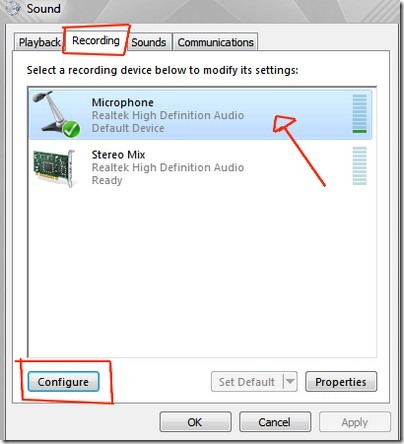
Next select the recording tab, click one of the microphone, and click configure.
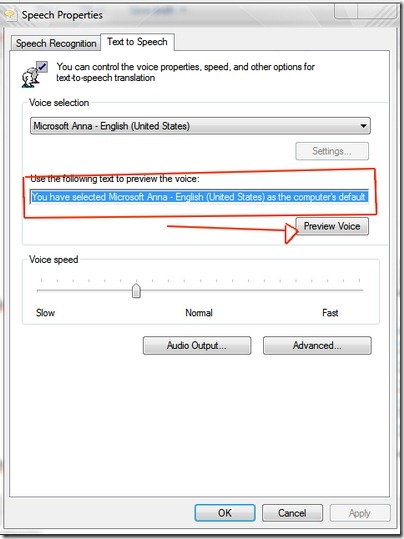
Next click “text to speech”.

This is how it looks, to use it, the red box the contents of the sentence / word to be spelled, having finished typing, click "preview voice" to listen.
Read More..
3/11/2012
Simple Trick to Accelerate Windows 7
would be fun if we are running windows 7 with maximum power, without having to leave the beauty of its visual appearance. Most windows 7 visual themesnya heavy because that does require a fairly high spec. There are many who say the software can accelerate performance of Windows 7, but most of it false, and even increase the weight of memory performance. I provide the following basic tips speed up windows 7 without any additional app, just needs flasdish as virtual, and several smaller settings, for ease performance memory / RAM.
First we personalizenya setting. Right click "Computer".

At the bottom left corner click "Personalize informations and tools", proceed to click a command on the upper left corner of the "Adjust visual effects", adjust setingannya the image below. Leave fit the image, and checklists for the else leave it blank.
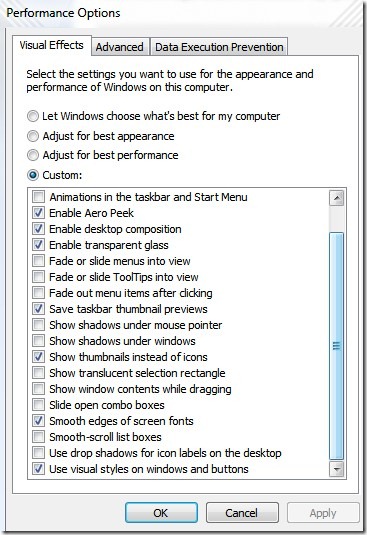
Once clicked ok, the taskbar back to basic, but it will be normal again after the restart. But before the restart, proceed kesetingan second, the virtual memory. Still in the same menu of "adjust visual effects", click the tab "advanced". Click the button "change.

Uncheck the command "Automatically manage paging size for all drivers", then setting up swap / virtual memory. First click c drive at all, check the custom drive, fill as needed, look at the picture. Save by clicking "set". Do not forget to click ok

Do the same on different drives, all drives have preferred this configuration. For the last step can use the Ready Bost additional memory via flasdisk. Use flasdis with a minimum size of 2 Gb, and a maximum of 4 Gb. After flasdisk ditancanpkan, then right-click menu entry "properties" select the tab "ready boost" choose "this dedicated driver to redy boost" to use all, and ok Restart windows so that all visual themes settngs back to normal.

Read More..
3/08/2012
How To Install Windows 7 Custom Themes
Here I will not make custom windows themes, but how do I install this themes, patch file from windows, install the themes, and custom themes recomendasi web providers windows. But that has not previously know the beauty of custom windows themes, can see the pictures below.

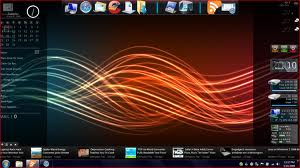
How to Patch ?
Previous first donwload application patch here. Application name is the "Universal Theme Maker". Unrar and install the application. Select 86bit (32bit) or 64bit according to your operating system, after arriving at the figure below. If your operating system appears have been detected. Click yes.

next step, press patch, to start patching themes, or restore to restore old themes.

Reboot your computer if done.
Install themes
Download themes that will advance you to install, many kinds of themes, there are to be installed or copied to the windows system "
C: Windows-Resources-Themes ". If there are themes in the download that exe file mean it has to be installed. But there's not found exe file, directly copy to :
Setting Glass Efect
Mostly there are themes that have a full glass feature, but maybe we can not use it anymore because it requires additional app called "glass.exe" download here.
In order to continue glassnya pleased runing at startup, use the following way, make sure you've installed the application, the next glass create a shortcut file in program files to
startup folder
"Star-All Programs-Starup (Explore)".
Problem :
Jika ada masalah dengan tampilan office yang menjadi hitam.
1. Di desktop, klik kanan-personalize
2. Windows Color-Advance appearance settings
3. Item-Scroll ke bawah cari Window
4. Ganti Color1 Ke warna putih
5. Apply-ok
Read More..
3/01/2012
Using Bluetooth on Windows 7
Current computer models such as bluetooth flasdisk and plugged in the USB, the price is quite reasonable that 30,000, - or the rest is for better quality. Here I only explain how to use Bluetooth as a medium for sending or receiving files. Of course after the installation process you have selesai.Tanda bluetooth driver bluetooth you have read the computer is the appearance of a small bluetooth icon in the hiden bar or the bottom right corner. Having read by a computer bluetooth, now we will install a special independent taksbar bbluetooth connection. The way you write in startmenu "bluetooth". Then the resultant search at the top, pops up a menu "bluetooth file transfer", you drag the taskbar menu to serve targeted for ease of use.
Add Device Process
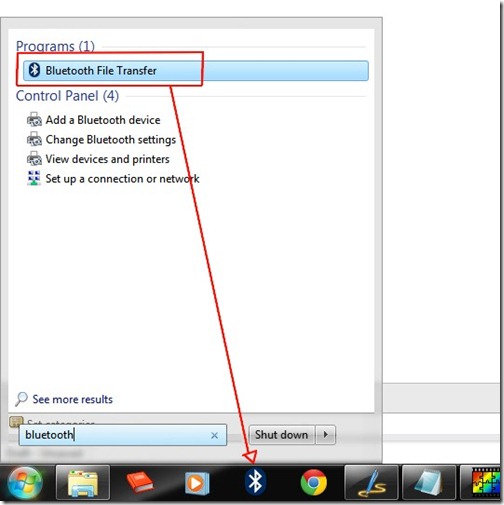
You open the bluetooth menu. Then there will be two menus, the "send files" to send files and "received files" receiving files. But we can not add device to use it before the HP or our bluetooh device. As an example I will send photos from my phone to my laptop via bluetooth. Because the new use must go through the process of "add devices".
Right-click the little bluetooth icon in bottom right corner before, select "add devices", the windows automatically search for an affordable bluetooth.

Once connected, the Hp you are asked to enter a combination of the numbers listed on the computer screen / laptop. You need to fill up quickly so that the "add devices" is not stopped, if there is already a success message means that you can transfer data via bluetooth with a computer. These devices add process only once for the same hp, and should be done if there is a new Hp was first associated with computer bluetooth.
Transfer Files
After 2 bluetooth devices on, just choice your fungtion, select "send" to send files, or "receive" to receive files
Change Windows 7 Logon Screen

Difficult than simply configuration settings to change the display windows initially, it is better to use a special application, because changing the configuration can affect performance extends to the windows. This application can be used to change the display of all kinds of windows logon screen. Click 'Read More' to download.
Download TweaksLogon (Ziddu support)
if that link not working, please leave a comment
Read More..
Subscribe to:
Posts (Atom)
Popular Posts
-
Tittle : Ubah Tampilan Keyboard Android Dengan Swiftkey Keyboard Author : Yusuf Akhsan Hidayat information Android phone that is alway...
-
 Hobbies chat with friends on Facebook? Maybe you feel something is missing when chatig on Facebook because there is no such facility in yah...
-
 With a lot of followers, twitter users will have their own pride, especially for the newbie. But sometimes they are upset when it has succ...
-
Free : - http://duniadownload.com - http://www.addebook.com disupport oleh google - http://carigratisan.com/category/ebooks-mags - h...

Others Places
 |  |  |
1001Shortcuts Owner

Yussan used to be called, is currently studying S1 Computer Science at STMIK Amikom Yogyakarta.

Pair Our Link

Tracker
