3/12/2012
English Spell With Windows 7

This is actually a kind of free facilities in windows 7 seven is used as a way to test our microphones, whether well or not useful. How it works, sentence or word in the English language no matter what we write in the box provided, can be clearly spelled by the windows in the form of sound.
To use it follow some instructions below.
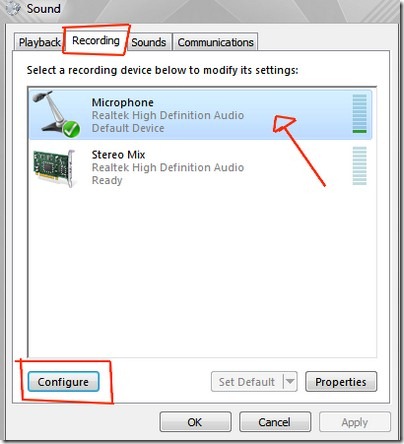
Onstartmenu searchbar write "sound", select the icon that has such an image.

Next select the recording tab, click one of the microphone, and click configure.
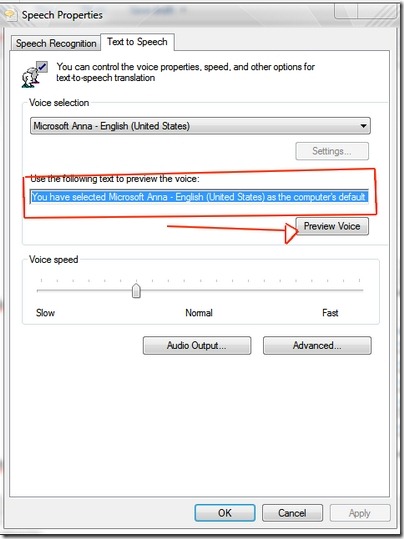
Next click “text to speech”.

This is how it looks, to use it, the red box the contents of the sentence / word to be spelled, having finished typing, click "preview voice" to listen.
Popular Posts
-
Tittle : Ubah Tampilan Keyboard Android Dengan Swiftkey Keyboard Author : Yusuf Akhsan Hidayat information Android phone that is alway...
-
 Hobbies chat with friends on Facebook? Maybe you feel something is missing when chatig on Facebook because there is no such facility in yah...
 -
Free : - http://duniadownload.com - http://www.addebook.com disupport oleh google - http://carigratisan.com/category/ebooks-mags - h...
-
 With a lot of followers, twitter users will have their own pride, especially for the newbie. But sometimes they are upset when it has succ...

Others Places
 |  |  |
1001Shortcuts Owner

Yussan used to be called, is currently studying S1 Computer Science at STMIK Amikom Yogyakarta.

Pair Our Link

Tracker
